The Weather Channel - Radar
The Weather ChannelWeather
4.6550.50K Reviews
- Version
- 16.26.0
- Installs
- 100.00M
- Age Rating
- Everyone
Screenshots
Our Review of The Weather Channel - Radar
 Analysis by Appyee
For me, a weather app earns its place on my phone when it helps me make a decision before the sky changes, not just explain what happened afterward. The Weather Channel - Radar is built around that practical need: checking conditions, watching weather move on a map, and getting a warning when severe weather may matter to my plans. The experience is strongest when I have a connection and a reason to check the forecast in context, rather than treating the app as a guarantee that the day will unfold exactly as predicted.
When a connection changes the experience
Weather information is most useful when it reflects what is happening around me now, so connectivity is central to how I use this app. A radar view and current conditions are valuable for a quick decision, but they depend on getting fresh information. If I’m heading out, I try to check while I still have a reliable connection, especially when storms could affect a drive or an outdoor plan. I would not wait until I’m already in a low-signal area to decide whether the weather looks safe.
That habit also helps me read alerts sensibly. A notification can prompt me to open the app and assess what the conditions mean for my location and schedule; it does not replace checking the details. When a warning arrives, I look at the radar and the timing together rather than reacting to the alert title alone. Use a notification as a cue to check, not as a complete plan. For urgent safety decisions, I would also follow local instructions and official emergency guidance.
Useful checks on the move
The Weather Channel works well for the small weather decisions that crop up throughout a day: whether to take a jacket, when to walk the dog, or whether an outdoor errand is worth doing now. The radar is particularly helpful when a forecast changes from an abstract chance of rain into a visible system I can watch approaching. I find that more useful than repeatedly refreshing a single temperature reading, because it gives me a reason to adjust the timing of an activity.
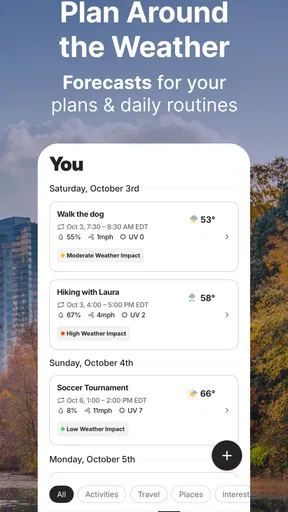
A realistic example is a weekend plan that starts with a dry morning but may run into showers later. I can check the forecast before leaving, use the map to judge whether rain appears to be moving toward the area, and decide whether to bring an extra layer or move the walk earlier. That is a planning aid, not a promise of exact local timing; conditions can shift, and I would recheck before committing to a long outdoor trip.
What to do when updates are awkward
Like other connected weather tools, this app is less convenient when the network is slow or unavailable. Maps and changing conditions are most useful with current information, so I avoid assuming that a screen I opened earlier is still an accurate picture after a long stretch without a refresh. If a page appears slow, I give it a moment, try again when the connection improves, and use the information already visible only as a rough reference rather than treating it as a fresh update.
For travel, I make the important weather check before setting off and revisit it when I have a dependable connection. This is a simple workflow, but it avoids relying on a last-minute map load while I’m moving. I also keep alerts enabled only for the kinds of weather that could actually change my plans; too many notifications can make it easier to ignore the one that matters. The app is most helpful when I use it deliberately, not when I expect it to monitor every possible inconvenience for me.
Data, attention, and choosing the right tool
Radar maps, frequent checks, and weather media can use mobile data and compete for attention, so I save map browsing for moments when I need it rather than opening it out of habit. If I’m trying to conserve data, I can focus on the forecast and essential alerts instead of repeatedly loading visual layers or videos. The trade-off is that I get less of the visual context that makes radar useful. On a limited connection, a quick forecast check may be the more sensible choice.
Compared with a basic weather app that emphasizes a current temperature and a compact forecast, this one is a better fit for people who want radar and more context in one place. A simpler built-in weather tool may suit someone who checks the temperature once and moves on; a dedicated radar-first service may appeal more to someone who follows storms closely. I would choose The Weather Channel when I want a balance of everyday forecasts, map-based awareness, and severe-weather notifications, while recognizing that a forecast is guidance rather than certainty.
Features That Shine
When you first open The Weather Channel - Radar, you’re greeted with a sleek and user-friendly interface. The app is designed to deliver weather information quickly and efficiently, without overwhelming you with too many details at once.
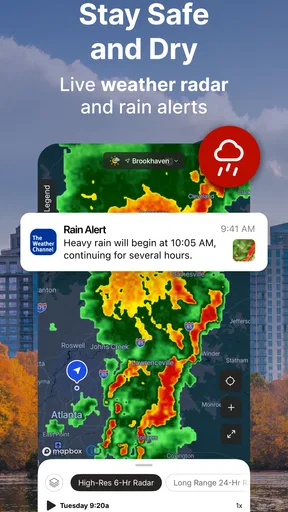
One of the standout features is its live radar maps. These maps provide real-time updates on weather patterns, allowing you to track storms right down to your specific location. It’s perfect for those who like to have a visual grasp of what’s happening in the skies.
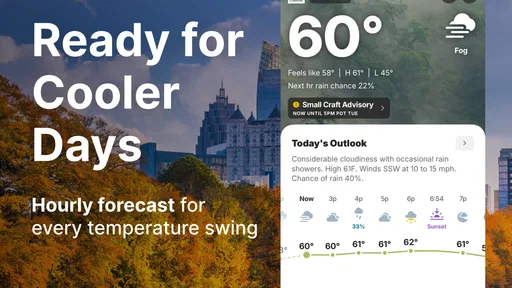
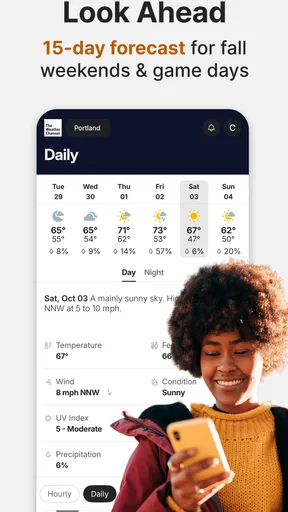
Additionally, the app offers a 10-day weather forecast, ensuring you can plan your activities well in advance. The forecasts are detailed, including temperature highs and lows, humidity levels, and wind speeds. This makes it easier to prepare for any unexpected weather shifts.
Alerts and Notifications
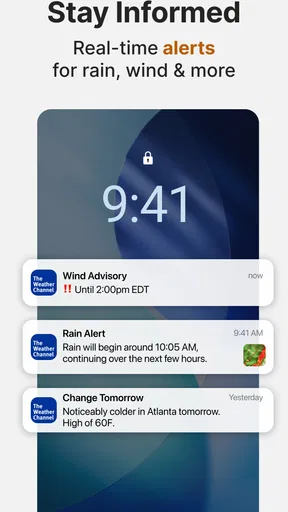
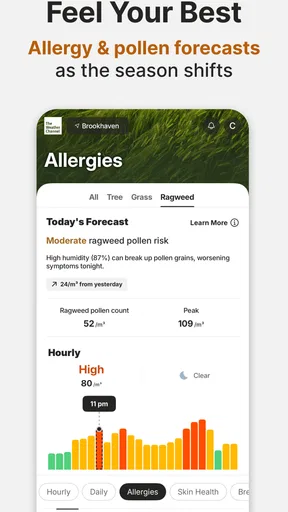
Another great feature is the customizable alerts. You can set up notifications for severe weather conditions like thunderstorms, hurricanes, or even pollen levels, which is a lifesaver for allergy sufferers. The timely alerts mean you’ll never be caught off guard, whether you’re at home or traveling.
Additional Perks
Beyond the essential weather updates, the app also provides a “Feels Like” temperature, which takes into account humidity and wind chill. This is super helpful, especially when the actual temperature doesn’t quite match how it feels outside.
For those who love a deep dive, there’s also a section with weather-related news and videos. This feature is great for anyone interested in learning more about global weather patterns or specific meteorological events.
Everyday strengths and sensible limits
The different forecast details answer different questions, and I get more value from them when I check the one that fits the decision. Temperature highs and lows help with clothing and scheduling; wind speed matters more for cycling, outdoor work, or a breezy waterfront walk; humidity can explain why a warm day feels draining. The “Feels Like” figure is useful as a quick comfort check, but I would not use it as a substitute for looking at the actual conditions when planning strenuous activity.
The longer outlook is most helpful for spotting broad patterns, such as a run of cooler days that might affect a trip or garden plans. I treat far-ahead details as provisional rather than expecting each hour or exact temperature to hold. A practical approach is to use the extended forecast to decide what needs attention, then revisit the nearer forecast as the day approaches. That avoids over-planning around details that are naturally more changeable further out.
Alerts can also be useful beyond severe storms. Someone managing seasonal allergies may appreciate pollen-related notifications, while a traveler may care more about warnings that could disrupt time outdoors. I would tailor the alert settings to the risks I actually face and check that the phone can deliver notifications. If every category is switched on, the volume may become distracting; if everything is off, the app cannot serve as a timely nudge.
Who will get the most from it
I’d recommend this app to people who make weather-sensitive plans: commuters choosing when to leave, parents organizing outdoor activities, travelers checking conditions before a drive, and anyone who wants a radar view alongside a forecast. It also suits curious users who like to understand how weather is developing rather than seeing only a number for the current temperature. Its combination of maps, alerts, and forecast details gives those users several ways to answer a practical question.
It may be more than necessary for someone who only wants a quick glance at today’s temperature, or for a person who prefers a quiet, minimal screen with little extra content. The news and video section adds another way to explore, but it may be irrelevant if all I need is a fast check before leaving home. People who follow storms as a serious hobby may also want a specialist tool alongside it, since a general-purpose weather app is not the same as a dedicated meteorological workspace.
There is also a trade-off between detail and attention. More information can help me make a better decision, but it can tempt me to keep checking without changing what I do. I try to open the radar when the map can answer a real question—whether to delay a walk, change a route, or bring rain gear—and otherwise rely on the forecast summary. That keeps the app useful rather than turning every uncertain cloud into a reason to refresh.
Cost, compatibility, and what to expect
The Weather Channel is a free weather app from The Weather Channel, with in-app purchases priced from $0.99 to $29.99 per item. That makes it easy to start using without paying upfront, while anyone considering an optional purchase should check what it offers and whether it solves a need they actually have. I would begin with the free experience and decide later, rather than assuming a paid item is essential for ordinary forecasting.
It is rated for Everyone and has a 4.6 average from around 3.4 million ratings, with more than 100 million installs. Those figures suggest that it is a widely used option, but they do not tell me whether its particular mix of radar, alerts, and additional content suits my habits. The current version is 15.8.1, and it requires Android 9 or later. For someone choosing between weather apps, compatibility and personal preference matter more than popularity alone.
The question I would ask before installing is not simply whether it has a forecast, but whether I will use its extra context. If I routinely check storm movement or need weather alerts, the radar and notification features make a stronger case for keeping it. If I only check the temperature once each morning, a simpler option may be quicker and less distracting. Either way, I would test how it fits my routine before relying on it for a trip or an important outdoor event.
My Takeaway
All in all, The Weather Channel - Radar app is a solid choice for anyone looking to stay informed about the weather. Its blend of intuitive design, detailed forecasts, and real-time alerts makes it a must-have tool on your smartphone.
Whether you're a weather enthusiast or just want reliable information at your fingertips, this app covers all the bases. So go ahead, download it, and never let the weather surprise you again!
My connectivity verdict
My recommendation comes with one practical condition: use the app as a connected planning tool, not as a substitute for judgment when the signal is weak or the weather is dangerous. Check before you leave, look at the radar when it can affect a decision, and treat alerts as prompts to pay attention. That approach makes the most of what this weather app does well while keeping its limitations in view.
Privacy and Permissions
See what permissions an app requests and how it handles your data.
- Calendar
- read calendar events plus confidential information
- Location
- approximate location (network-based), precise location (GPS and network-based)
- Phone
- read phone status and identity
- Wi-Fi connection information
- view Wi-Fi connections
- Device ID & call information
- read phone status and identity
- Other
- view network connections, change network connectivity, full network access, run at startup, prevent device from sleeping
Verdict
Strengths of The Weather Channel - Radar
- Accurate and up-to-date weather forecasts.
- Detailed radar maps with easy navigation.
- Customizable weather alerts for your location.
- User-friendly interface and intuitive design.
- Includes helpful video updates and news.
Limitations of The Weather Channel - Radar
- Contains ads that can be intrusive.
- Some features require a subscription.
- Occasional delays in radar updates.
- Drains battery quickly on some devices.
- Limited offline functionality.
Similar Picks in This Category
View All
Weather - By Xiaomi
Xiaomi Inc.4.1

Weather & Radar Forecast
WetterOnline4.8

Weather
OneLouder Apps4.6

AccuWeather: Weather Radar
AccuWeather3.6

1Weather Forecasts & Radar
OneLouder Apps4.3

Transparent clock and weather
MACHAPP Software Ltd4.2
You May Also Like
View All

Frequently Asked Questions
What features does The Weather Channel app offer?
The Weather Channel app provides a comprehensive suite of features, including real-time radar, weather alerts, and detailed forecasts. It offers hyper-localized conditions and the ability to track weather events globally. Users can also access interactive maps, video forecasts, and personalized notifications, ensuring they are always informed about upcoming weather changes.
Is The Weather Channel app free to use?
Yes, The Weather Channel app is free to download and use. However, it offers in-app purchases and subscription options for users who want an ad-free experience or access to premium features such as advanced radar tools and extended forecasts. These premium options enhance the overall experience for dedicated weather enthusiasts.
How accurate are the weather forecasts on The Weather Channel app?
The Weather Channel app is known for its high level of accuracy in forecasting. It uses cutting-edge technology and a vast network of data sources to provide real-time updates. However, like any weather service, it’s important to remember that forecasts can change rapidly due to unforeseen meteorological conditions.
Does The Weather Channel app drain battery life significantly?
While The Weather Channel app is feature-rich, it is designed to minimize battery consumption. Users can customize background data usage and notification settings to further conserve battery life. It's advisable to monitor your device's battery usage initially to ensure it aligns with your expectations.
Can I customize the alerts and notifications on The Weather Channel app?
Yes, The Weather Channel app allows extensive customization of alerts and notifications. Users can set specific alerts for severe weather conditions, daily forecasts, and breaking news. Customization options ensure users receive pertinent information tailored to their location and personal preferences, enhancing usability and relevance.
